Unlock Your Inner
Musician

Play, practice, and compose with 12 instruments, 170+ built-in sheets, and 100+ visual themes — all with sub-20ms latency. Available as a browser extension and desktop app for Windows & Linux. Fully offline, ad-free, and designed for every skill level.

User avatar
User avatar
User avatar

Trusted by 500+ artisans of sound across platforms (Jan 2026)

🎵

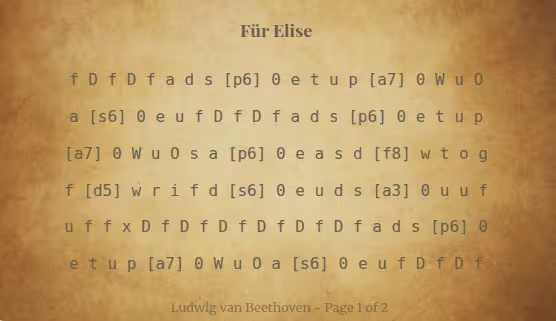
Für Elise

Ludwig van Beethoven

fDfDfads [p6] 0etup [a7]

0WuOa [s6] 0eufDfDfads

[p6] 0etup [a7] 0WuOsa [p6]

0easd [f8] wtogf [d5] wrifd

[s6] 0euds [a3] 0uufuffx

DfDfDfDfDfDfads [p6] 0etup

Page 1 of 1

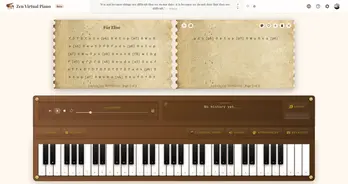
Zen Virtual Piano Interface - Professional 61-key virtual keyboard with instrument settings

🎶

How We Compare

A side-by-side comparison of Zen Virtual Piano vs virtualpiano.net, Chrome Piano, and Online Piano — across 9 features including offline mode, instrument variety, and ad-free experience.

Feature
Zen Virtual Piano
virtualpiano.net
Chrome Piano
Online Piano

Number of Keys

61 (C2-C7)

88

68

68 (adjustable)

Offline Mode

Ad-Free Experience

Yes (with Premium version)

Instrument Variety

12 (Piano, Organ, Guitar, etc.)

20+

Piano Only

Piano Only

Recording & Playback

Yes (30 sec)

Built-in Music Sheets

170+

Yes (User-generated)

50+

Visual Themes

100+

Light/Dark

Sustain Pedal & Metronome

Yes (No metronome)

VirtualPiano.net Integration

N/A

No

No

Designed for Flow

Each feature hand-formed to perfection, like pottery on a wheel.

Recording & Playback

Capture performances in real time, review your playing with instant playback, and export recordings to share.

Full-Featured Virtual Piano

Play 61 keys (C2-C7) via intuitive QWERTY mapping with polyphonic support, visual feedback, and sub-20ms audio latency.

12 Professional Instruments

Choose from 12 high-fidelity instruments: 2 pianos, 2 organs, violin, 4 guitars, saxophone, harp, and cello — all rendered via the Web Audio API.

Virtualpiano.net Integration

Auto-detects virtualpiano.net sheet pages, captures title, artist, and notation, and imports them directly into your library.

Key Assist Learning Mode

Visual key highlighting guides beginners through songs step-by-step. Learn at your own pace with real-time on-screen cues.

Advanced Controls

Fine-tune your sound with sustain pedal simulation, adjustable volume, built-in metronome, and sub-20ms latency via Web Audio API.

170+ Built-in Sheets

Access a curated library of 170+ popular songs with built-in notation. Browse, select, and start practicing instantly.

100+ Visual Themes

Personalize your workspace with 100+ themes spanning cultural, spiritual, and modern designs — each crafted for focused practice.

Works Offline

Fully offline after installation. All 12 instruments, 170+ sheets, and 100+ themes are bundled locally — zero server dependency.

Choose Your Platform

Install Zen Virtual Piano on your platform of choice and start enjoying an offline yet rich piano experience.

Windows logo

Windows

Windows 10 version 14316.0 or higher

Linux logo

Linux

Supports all distros via Snap Store

macOS logo

macOS

Extension Required

Currently not supported natively. Use browser extension for full functionality.

Google Chrome logo

Google Chrome

Chromium-based browsers: Brave, Opera, Vivaldi

Microsoft Edge logo

Microsoft Edge

Microsoft Edge Store

Common Questions

Have questions about Zen Virtual Piano? Find answers to common questions below.

Zen Virtual Piano is a free, multi-platform virtual piano with 61 keys spanning 5 octaves (C2-C7). Built with Web Audio API and Tone.js for sub-20ms latency, it delivers studio-quality sound. Available in 3 ways: (1) a free web app at zenpiano.art/play — no install needed, (2) a browser extension for Chrome, Edge, Brave, and Vivaldi, and (3) a native desktop app for Windows (Microsoft Store) and Linux (Snap Store). It serves over 500 musicians, students, and composers across 9 countries (Jan 2026).

Yes, Zen Virtual Piano is 100% free with no registration, no ads, and no in-app purchases. The full feature set — 61 keys, 12 instruments, 170+ sheets, 100+ themes, recording, and virtualpiano.net integration — is available at no cost. Install the browser extension on Chrome, Edge, Brave, or Vivaldi, or download the native desktop app for Windows (Microsoft Store) or Linux (Snap Store).

Zen Virtual Piano includes 12 instruments: Classical Piano, Grand Piano, Standard Organ, Harmonium, Violin, Acoustic Guitar, Electric Guitar, Nylon Guitar, Electric Bass, Saxophone, Harp, and Cello. Each instrument is sampled at high fidelity and rendered through the Web Audio API for low-latency playback.

Absolutely! The app includes a recording feature that lets you capture your performances, play them back for review, and even export them to share with others.

The piano has an intuitive QWERTY keyboard mapping. The number keys handle bass notes, while the QWERTY rows (top, home, bottom) cover the middle and high ranges. Use the Shift key to play sharps and flats (black keys).

Yes, Zen Virtual Piano works fully offline after installation. All 12 instruments, 170+ music sheets, and 100+ visual themes are bundled locally. The extension uses Service Workers and the Web Audio API to deliver zero-latency performance without any server dependency — ideal for practice sessions without internet access.

Yes! Zen Virtual Piano offers a free web app at zenpiano.art/play that runs directly in your browser — no installation required. You get the full 61-key piano with 12 instruments, 170+ sheets, and 100+ themes. For the best experience with offline mode and sub-20ms latency, you can also install the browser extension (Chrome, Edge, Brave, Vivaldi) or the desktop app (Windows, Linux).

Zen Virtual Piano is a top alternative to virtualpiano.net. Key advantages: fully offline (vs online-only), completely ad-free (vs ad-supported), 100+ visual themes (vs no customization), 12 instruments (vs 20+ but ad-interrupted), and built-in integration that automatically detects, downloads, and plays virtualpiano.net music sheets — no copy-pasting required. Unlike virtualpiano.net which is web-only, Zen Virtual Piano is also available as a native desktop app for Windows and Linux.

Zen Virtual Piano delivers sub-20ms audio latency via Web Audio API — faster than most online pianos that rely on server-side processing. It includes 12 instruments, 170+ built-in music sheets, 100+ visual themes, sustain pedal simulation, a built-in metronome, and recording/playback. Available as both a browser extension (Chrome, Edge, Brave, Vivaldi) and a desktop app (Windows, Linux), it loads instantly with zero ads and works entirely offline.

Zen Virtual Piano offers significantly more features than Chrome Piano: 12 instruments (vs piano only), 170+ music sheets (vs 50+), 100+ visual themes (vs light/dark only), sustain pedal simulation, built-in metronome, recording with export, and automatic virtualpiano.net sheet integration. While Chrome Piano is only a browser extension, Zen Virtual Piano is also available as a native desktop app for Windows and Linux — making it a true multi-platform musical toolkit.

Zen Virtual Piano is purpose-built for serious practice: 61 keys (C2-C7) with sub-20ms latency, 12 instruments, 170+ curated music sheets, 100+ visual themes, offline-first architecture, and a unique virtualpiano.net integration that auto-detects sheet pages and imports notation directly. It is 100% free, ad-free, and truly multi-platform — available as a browser extension (Chrome, Edge, Brave, Vivaldi) and a native desktop app (Windows via Microsoft Store, Linux via Snap Store).